Deals Module
This page describes how the CRM Deals module is currently used by Peppermint automations, reports, and the Deal Kanban board.
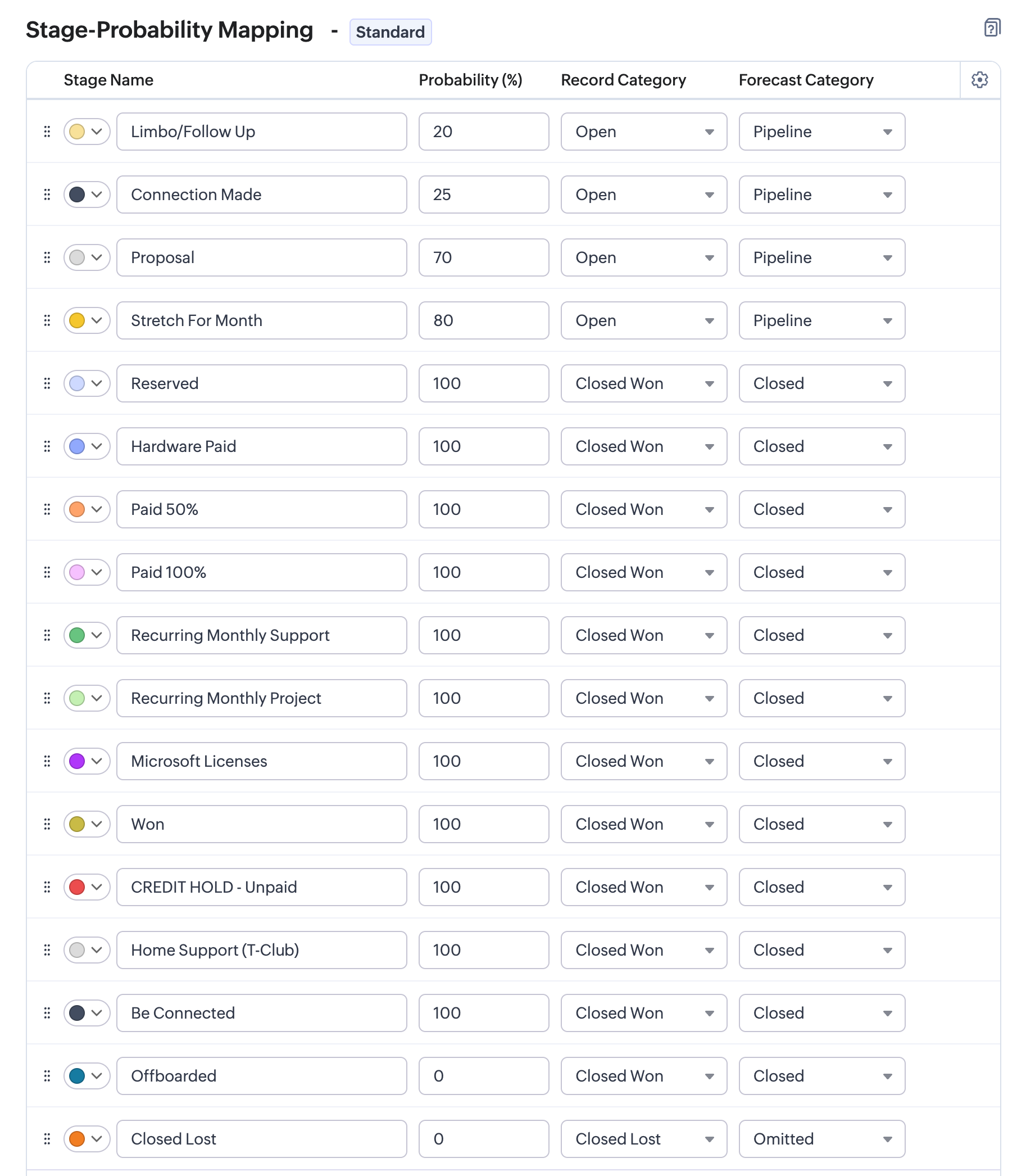
Stage setup recorded from Zoho CRM on 2026-07-10:
Operating Model
The Deal record is durable, but its sales process has a clear end. The active sales pipeline finishes when the opportunity reaches either:
Reserved: the client-approved Deal is commercially won; orClosed Lost: the opportunity did not proceed.
Reserved is a 100% probability, Closed Won / Closed stage. It is also the
implemented handoff stage for MSP and Tech Project automations.
The stages after Reserved are retained as a temporary Kanban dashboard. They
are all closed-won display categories rather than further steps in the core
sales process. They may show a useful summary such as paid, recurring support,
licenses, credit hold, or offboarded, but they are not the source of truth for
payment, delivery, or service state.
Stage Boundary
Active Sales Pipeline
These stages are open pipeline stages:
| Stage | Probability | Meaning |
|---|---|---|
Limbo/Follow Up |
20% | An opportunity needs follow-up or is not yet actively progressing. |
Connection Made |
25% | Contact has been established and the opportunity is being qualified. |
Proposal |
70% | The Qwilr proposal has been prepared or issued. |
Stretch For Month |
80% | The opportunity is still open but is being treated as a possible result for the month. |
Terminal Sales Outcomes
Reservedis the successful end of the sales pipeline. It has 100% probability and is categorized asClosed Won/Closed.Closed Lostis the unsuccessful end. It has 0% probability and is categorized asClosed Lost/Omitted.
Moving a signed Deal to Reserved records that the commercial decision has
been won. Waiting for payment, delivering the work, activating recurring
support, or later offboarding the client does not undo that outcome.
Post-Win FYI Stages
The following stages sit after the sales boundary and are currently kept to maintain the whole-business Kanban view:
Hardware Paid;Paid 50%;Paid 100%;Recurring Monthly Support;Recurring Monthly Project;Microsoft Licenses;Won;CREDIT HOLD - Unpaid;Home Support (T-Club);Be Connected;Offboarded.
These are all Closed Won / Closed stages. Except for Offboarded, which is
shown at 0% for the current board, they are shown at 100%.
They are not a required sequence and a Deal does not need to pass through each one. A user may move a won Deal to the most useful current display column, but the label is informational only:
- payment truth belongs to the CRM/Xero invoice process;
- delivery truth belongs to the linked Project and its tasks;
- recurring-service truth belongs to the Managed Services Plan, seats, and invoice lines;
- offboarding truth belongs to the service-plan/offboarding process.
Because one Deal can appear in only one Stage column, these FYI labels cannot reliably represent several simultaneous states. They should progressively be replaced by operational CRM or Power BI dashboards.
Automation Boundary
Reserved is the only closed-won stage used by the implemented Deal delivery
handoff. The middleware checks for the exact Reserved value and runs only for
MSP and Tech Project business categories.
Moving a Deal from Reserved to a later FYI stage is not a new commercial
event. Later stage changes should not create or update Projects, Managed
Services Plans, Delivery Models, or invoices. Do not move a Deal back to
Reserved to communicate payment or delivery state; depending on the CRM
workflow trigger, that can invoke the reserved setup again.
The current operating boundary is:
- A signed Qwilr or equivalent approved purchase order justifies moving the
Deal to
Reserved. - Moving the Deal to
Reservedinvokes the current delivery handoff. Closed Lostrecords opportunities that do not proceed.- Any later FYI stage movement is presentational and must not drive core automation.
Fields Used By Current Automation
Deal_Name: used as the Zoho Project name when a project is created.Owner: matched to a Zoho Projects user by email where possible.Stage: the current reserved handoff checks for exact valueReserved.Business_Category: controls which automations run.HardwareandHomeskip project creation; reserved setup runs only forMSPandTech Projects.Amount: used in reporting and to seed Tech Project Delivery Model value.Closing_Date: updated to today when reserved setup succeeds.project_idandproject_link: link the Deal back to the Zoho Project.Account_Name,Plan_Type,Number_of_Staff,Type,ACV, andProbability: used by Deal reporting.
Implemented Behaviour
- On Deal creation, middleware creates or reuses a Zoho Project, links it to the
Deal, and ensures a
Scopingtasklist,Scopingtask, andScopingDelivery Model exist. - When an MSP or Tech Project Deal reaches
Reserved, middleware closes theScopingtasklist, attempts to end theScopingDelivery Model, updates the Deal closing date, and creates the next Delivery Models for the Deal type. - The reserved middleware skips Deals in any other stage. It also skips Deal categories other than MSP and Tech Project.
- Reporting exports Deals with account metadata and a linked Delivery Model count.
Current Limits
- Reserved setup does not create a missing project; the Deal must already have
project_id. - Generated Delivery Models are starting points. Amounts and labour values still need review against the signed Qwilr.
- The post-win FYI stages are manually maintained presentation fields. They do not replace structured payment, delivery, or recurring-service records.
- The existing project-at-Deal-creation and reserved Delivery Model automation are current V1 behaviour. The V2 design proposes replacing them with a Qwilr-accepted-line handoff.
See also: Deal Process, Deals, Projects, and Delivery Models, and Deal Process V2.